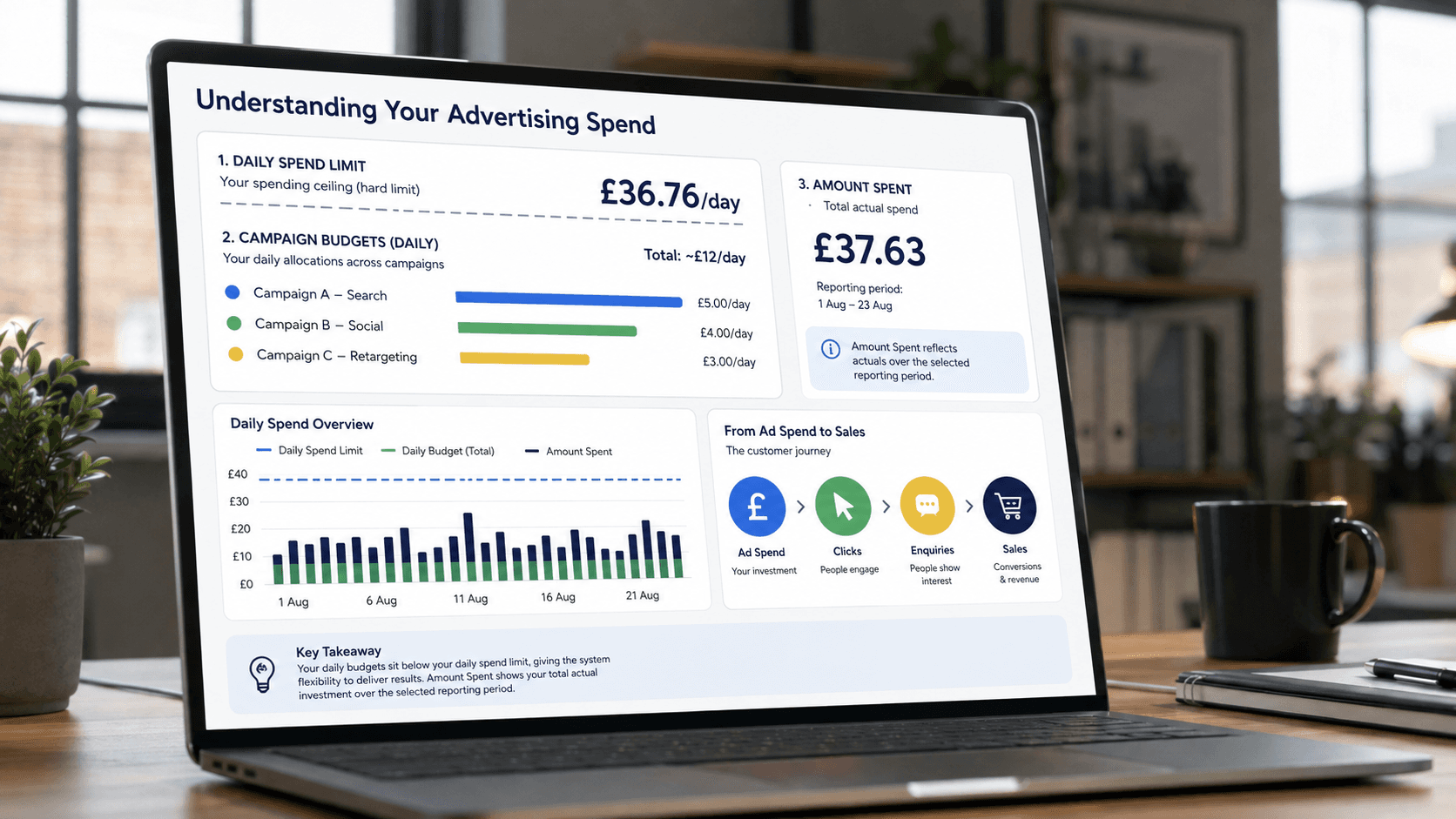

Your daily spending limit tells you how much Meta will allow the account to spend. Your campaign budget tells Meta how much you actually want to spend.
A small business starts advertising on Facebook.
One campaign promotes the company page.
Another drives visitors to the website.
A third promotes a particular post.
Then the owner opens the Meta billing screen and sees:
Daily spending limit: £36.76
It is easy to assume:
“Meta is going to spend £36.76 of my money every day.”
But that is not what the number means.
The daily spending limit does not necessarily equal the amount of money that you have told Meta to spend.
It is the maximum Meta currently allows the entire advertising account to spend in one day.
That distinction matters.
Think of the daily limit as a ceiling
Imagine the daily spending limit for the advertising account is:
£36.76
But the business has only created campaigns with combined budgets of £12 per day.
Meta does not automatically increase the advertising spend to £36.76.
Even though the account is allowed to spend up to £36.76 in a day, the campaigns will still operate according to the budgets that have actually been set for them.
The £36.76 is simply the account-level ceiling.
If several active campaigns together try to spend more than the account's daily spending limit, Meta can stop further delivery once the account reaches that limit.
So:
Campaign budget = what you are asking Meta to spend.
Daily spending limit = the maximum Meta is currently prepared to let the account spend.
They are not the same thing.
Meta does not simply divide the limit between your adverts
Another easy assumption would be:
“£36.76 ÷ 4 campaigns = £9.19 per campaign.”
That is not how it works.
The daily spending limit is not divided equally among all active campaigns.
Each campaign or ad set operates according to the budget you have given it, together with the audience, objective and opportunities Meta has to deliver the advert.
A campaign with a higher budget, different audience or different objective could therefore spend more than another campaign in the same account.
The daily account limit is simply a roof over the entire advertising account.
Amount spent means something different again
The Ads Manager report may show:
Amount spent: £37.63
or:
Amount spent: £35.33
Those figures can look confusing when the account's daily spending limit is £36.76.
But the report may be showing spending across a much longer period.
For example, if the report covers:
1 August – 23 August
then £37.63 represents the campaign's accumulated spending during that reporting period.
It does not mean that £37.63 was necessarily spent today.
Always check the reporting dates before interpreting the amount spent.
Be careful with duplicated-looking rows
Ads Manager reports can also look as if they are repeating the same numbers.
For example, a campaign might display:
£37.63
and immediately underneath, its ad set may also display:
£37.63
That does not mean Meta has charged £75.26.
The first row may show the total at campaign level.
The row beneath it may show the same spend at ad-set level.
You are looking at the same advertising spend from two different levels of the campaign structure.
When reviewing the account, the overall total amount spent is what tells you how much the account has actually spent across all advertising.
This is an important distinction when reading Ads Manager reports.
The billing threshold is different too
Meta may also display another number such as:
Billing threshold: £9
This is not an advertising budget either.
It relates to when Meta charges your payment method.
Even while the adverts continue running, Meta may charge the card when the billing threshold is reached.
The account can therefore show:
✓ money already spent on advertising;
✓ a current unpaid balance;
✓ a billing threshold;
✓ individual campaign budgets;
✓ an overall daily spending limit.
Those are five different things.
A practical small-business example
Imagine a small agricultural machinery dealer advertising lawn mowers and compact tractors on Facebook.
It has three active campaigns:
✓ A page-awareness campaign.
✓ A campaign sending potential customers to the machinery website.
✓ A promoted post advertising a seasonal product.
Suppose the account's daily spending limit is:
£36.76
That does not mean the business will automatically spend £36.76 every day.
The owner does not need to ask:
“How do I spend my £36.76?”
The better question is:
“How much am I deliberately allocating to each campaign, and what am I receiving in return?”
This changes the focus from simply spending the available advertising allowance to understanding whether each campaign is actually producing something useful.
Cheap clicks are useful — but they are not the final result
Imagine one advertising campaign produces:
259 website clicks for £35.33
That works out at roughly:
£0.14 per click.
Another produces:
140 clicks for £17.80
or roughly:
£0.13 per click.
Those numbers can indicate efficient traffic generation.
But the business still needs to ask:
What happened after the click?
Did the visitor:
✓ look at machinery?
✓ request a quotation?
✓ call the business?
✓ submit an enquiry?
✓ eventually buy something?
A cheap click is not necessarily cost-effective if it produces no commercial activity.
On the other hand, a £1 click that eventually contributes to a £10,000 machinery sale could be extremely valuable.
The advertising platform can tell you the cost of attracting attention.
Your business systems need to tell you whether that attention eventually generated business.
This is where advertising becomes a data problem
The most useful advertising view for a small business is therefore not simply:
How much did Facebook spend?
The owner needs to see what happened after the advertising brought somebody to the business.
For example:
Advert spend → Website visit → Product viewed → Enquiry → Quote → Sale
Now the owner can ask:
Which campaigns are actually producing customers?
That is far more useful than simply knowing which advert generated the cheapest click.
What should a small business watch?
There are many numbers inside Meta Ads Manager.
Most small businesses do not need to monitor all of them every day.
Start with a few:
✓ Spend — how much money has actually been used.
✓ Cost per useful result — how much the business is paying for the result the campaign is intended to generate, such as a click or enquiry.
✓ Business outcome — whether those results eventually turn into leads, quotations or sales.
The daily spending limit is important because it tells you the maximum amount that the advertising account is currently allowed to spend in a day.
But the daily spending limit does not tell you whether the advertising is performing well.
Key Takeaway
The Meta daily spending limit is not a target for your advertising campaign.
It is not your campaign budget.
It is simply the maximum amount the advertising account is currently allowed to spend in one day.
Your business is still in control of the campaign budgets underneath it.
The more important question is not:
“How much will Meta allow me to spend?”
It is:
“Which advertising spend is actually producing something valuable for the business?”
Next Step
Microcorem helps businesses connect advertising data with the systems where commercial results actually happen.
Instead of stopping at cost per click, a useful business view can connect:
advertising spend + website behaviour + enquiries + quotations + sales
so you can see which marketing activities are actually contributing to the business.